


TREATLIFE
Smart Dimmer Plug
Smart Dimmer Plug
Couldn't load pickup availability
Key Features
- Compatibility: Required 2.4GHz Wi-Fi only, cannot connect to 5GHz. Works with non-smart dimmable LED, CFL, and halogen/incandescent bulbs (up to 300W). This dimmable smart plug supports 2-prong lights only. Not compatible with smart lights, non-dimmable lights, remote-controlled lights, low-voltage systems, fans or motorized devices
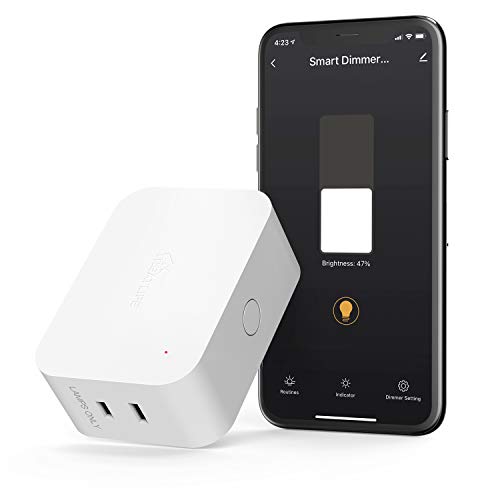
- 2-in-1 Dual Outlet, Unified Control for Two Devices: The two outlets work together as a single unit and cannot be controlled separately. This smart plug features two US-standard outlets, allowing you to control two lamps or string lights at the same time. Its compact, space-saving design ensures the bottom outlet remains accessible when plugged into the top, making it ideal for areas with limited outlets
- Smart Voice Control & Adjustable Dimming Range: Not for Homekit. Easily integrate these smart plugs with Alexa, Google Assistant, and SmartThings for seamless remote control. Enjoy the flexibility of adjusting brightness levels from 1%-100%. Simply give a voice command like "Alexa, dim the Christmas lights to 60%" to enhance your lighting experience
- Sunrise Simulation & Sleep Aid: Elevate your daily routine with sunrise and sunset simulation. Customize fade in/out times and brightness levels to create a personalized ambiance for waking up or winding down. Ideal for indoor Halloween, Christmas, Thanksgiving decorations, and daily lightings use. This plug in dimmer caters to diverse lighting needs with user-friendly functionalities
- Security and Convenience in One: Activate the Vacation Mode via the app to randomize ON/OFF schedules, creating the appearance of an occupied home while you're away. This not only deters intruders but also helps reduce electricity costs. The smart WiFi outlet operates independently without the need for a hub, FCC Certified
Specifications
| Brand | TREATLIFE |
| Product Type | ELECTRONIC_SWITCH |
| Item Type Keyword | wall-dimmer-switches |


- 5 stars: 5 (71%)
- 4 stars: 1 (14%)
- 3 stars: 1 (14%)
- 2 stars: 0 (0%)
- 1 star: 0 (0%)
[Style: 1 Pack]
It has its own app but it joins the network easily and works well with Alexa. I was a little concerned when the description mentioned that it only works with 2.4 GHz networks and not with 5 GHz networks. My network has both 2.4 GHz and 5 GHz with the same SSID (name) which was an issue with a LaCrosse weather station, but it was no problem with this dimmer plug. It joined the network right away.
[Style: 1 Pack]
We were so pleased after purchasing the first Treatlife smart dimmer plug about 3 years ago, we purchased a number of the units to place throughout our home. When one recently stopped functioning correctly, we emailed Treatlife and began a dialogue with Lumos in customer service. After answering a few questions, it was determined the unit had failed. Because we had purchased several identical units over time, we could not determine whether that unit was still under warranty - but I was almost certain this was one of the first we purchased, and well outside the 24-month warranty period. Obviously, I would have preferred not to spend to purchase a replacement unit, but accepted that Treatlife had no warranty obligation. I had considered reading reviews of Treatlife's competitors in deciding what to purchase as a replacement. But before I had an opportunity to do that, Lumos emailed to ask my shipping address. Within less than 2 days, a new unit was delivered. Well done, Lumos and Treatlife. I won't be looking at any competitors' products.
[Style: 1 Pack, Style: 1 Pack]
4 stars because instructions are challenging to understand. And because dimming manually with the button on the device is hard to control. And because 5 GHz wi-fi is not supported. I do not have Alexa or any such device. I have an Apple iPhone. They do make clear that your phone (from which you control the dimmer) must be on a 2.4 GHz wi-fi.Took me a couple of hours to figure out the following. From a browser on my laptop. enter 10.0.0.1 in the address line. You should get a login dialog for managing your router. The first time login for my Xfinity white router is user "admin", with password "password". Then you are immediately required to change the password. After logging in, go to the Connection section and click Status. There I saw that I have two wi-fi channels, 5 GHz (which I was using) and 2.4 GHz (which I was not using). The critical thing is to give them distinct SSID names so you can tell which one you are connected to. You can keep the password the same for both.From my laptop (which is about 25 ft from the router and on the other side of a doorway) using speedof.me, 5 GHz was about 10 times faster than 2.4 GHz.After I changed my phone to 2.4 GHz, finally I was able to connect the TreatLife phone app (downloaded via the QR code in the instructions, yes you give the company in China access to your phone) to the dimmer device, and it works. I will normally have my phone on the much faster 5 GHz wi-fi and need to change it to 2.4 GHz to control the dimmer, but switching wi-fi's is quick and easy.In the app control panel on my phone, the "indicator status" switch seems to be reversed. "On" turns off the tiny indicator light on the dimmer, and "Off" turns it on. It was not obvious to me how to turn on/off the light plugged into the dimmer. For awhile I kept changing the brightness with no response. Eventually I figured it out. See the attached snapshot. Now I'll find out how long this device lasts.UPDATE: I needed to have my iPhone wi-fi connected to 2.4 GHz to make the initial connection from the app to the dimmer device. But once that was made, the app controls the dimmer even when wi-fi and bluetooth are turned off on my iPhone, and even from a distance. Evidently via cellular. Also the "indicator status" switch in the app is now working correctly.
[Style: 1 Pack]
Update: I lowered the number of stars because if you install the app, you get flooded with pop up messages from them trying to sell you stuff. I tried turning messages off, and it somehow got turned back on. If that happens again, this gets one star and goes in the garbage.If you have two lamps, especially if you want to have brighter bulbs (1600 lm) this can be a cost effective solution. Setup with an app is similar to that of other smart devices, and was actually easier than the instructions would have me believe. As soon as I plugged the device in, it was ready to pair. Just make sure to set up an account using the app if you don't have one, and the rest is trivial.This device can be more expensive than some pairs of smart bulbs, but less expensive than a pair of 1600 lm smart bulbs, even if you add the cost of a pair of dimmable bulbs. So it may or may not be cost effective. If you want lower brightness or individual control, there are many smart bulbs on the market, including ones from this company. So far, the only one I used was from a different company and was not as reliable as a regular bulb with this device. I haven't tried this company's smart bulbs yet.In my case, this was the best solution for two bedroom lamps. It's easy to use with Alexa, but if you do go with smart bulbs instead, Alexa will let you control them together or individually depending on the command or configuration, so this is one of several options to keep in mind.
[Style: 1 Pack]
This is a great device for lights that do not have smart bulbs but have the dimming bulbs. It was easy to setup in the Treatlife app but I noticed it was the same app as Smart Life App so I changed it over to work with all my others Tuya based products in the Smart Life App. Worked great and did not have an issue transferring it over. I love that I can have only one app to control them all.Second part is integration into Alexa and Google Home was very easy. Since I already had the Smart Life Skill on my Google Home and Alexa it just found it. I also added it to my Home Assistant with ease since the Tuya Integration was installed. I like how simple it was to setup and start using.This is great way to add dimmers without having to get Smart Bulbs or a Smart Lamp for that matter. It give you the flexibility to have a Smart Plug that can dim too. So far Treatlife products have been outstanding compared to some of others I have used and tested in the past.
[Style: 1 Pack, Style: 1 Pack]
This was exactly what I was looking for! I have two hanging lanterns above my bed, but their placement meant needing to crawl across the bed to get to the switch. And I wanted the warm glow lighting of vintage incandescent Edison bulbs, not smart bulbs this time.I set up the dimmer easily with the treatlife app, then plugged each of the lanterns into the dimmer plug and instantly in business! Finally able to not just turns them on and off, but dim them to any levels. (And true, they are both only controlled as a group, not individually. Which works fine for me here but just be aware)After installing with the Trealife app (required to app for setup) but then easily integrated with Google home so I can use any of those apps and it responds great to any voice commands. They’ve also had GREAT customer service so far.And now I don’t have to literally walk across my bed (which was kinda ewww to do) and can just lay in bed as I’m falling asleep and ask for the lights to fade with me lol. Looking forward to playing with Treatlife’s other products as I slowly build my smart home system.(and just FYI, I did not receive this free or discounted to leave this review. Just very impressed and feeling chatty here in quarantine lol)
[Style: 1 Pack, Style: 1 Pack]
OVERALL: Amazing Product that is super easy to install, connect to network, keep connected after power outages and most of all easy to use! A+I have the whole house set up with smart devices! Almost every light, plug, ceiling fan, speaker, garage door and thermostat can be controlled by voice with Alexa. It all started with a WEMO device and quickly grew to over 60 units from various brands; some work awesome and some, well let's just say they are no longer part of my system.I purchased the Treatlife single pole wall switch to see how their product worked. I was pleasantly surprised when after a quick install to replace the wall switch; I was able to connect it to my network in about two minutes after installing the app! It connected superfast and started functioning perfectly. Alexa became aware of the new device and immediately added it without needing to "discover" new devices.Since then I have purchased several other Treatlife items that I couldn't be happier with. This dimmer is fantastic! When I purchased it, I didn't realize that you could control two lights! I was going to use it for a single lamp, but I changed my mind to control the lamps on either side of my sofa. It's great because both lamps are immediately set to the same setting. I have LED bulbs in those lamps that had zero issues with smooth dimming up and down, no flicker or humming! There are settings to reduce these issues if needed, but I didn't experience any. With other much more costly devices, I had the devils time trying to get my lights to dim without humming or flickering.Finally, I live in Florida, where we often get thunderstorms and quick power outages that wreak havoc with many smart devices requiring them to be reset via their app. Not so with the Treatlife devices, they will return back to their prior state and will reconnect automatically to the network. This alone is reason enough to replace everything with Treatlife devices, no hassles, no issues, no kidding!So what's the bad news? I love this product so much that I want every smart device in my home from Treatlife! That's a lot of device replacements... so I will have to progress slowly... but it will be worth it because this truly is an amazing product that does everything they say it will!